11.12.1
These examples illustrate how best to enter address details for complex and grouped properties into an LLPG. They show Authority Address Custodians how to deal with legacy data which are addresses that are in common use but have not necessarily been subject to the SNN process. New addresses created should not be numbered in the way these examples are, rather the conventions and best practice described in Section 4 should be adhered to. For this document’s definition of a House in Multiple Occupation (HMO), see Appendix J.
11.12.2 Legacy data examples
11.12.3 Alpha flat IDs (legacy data example 1)
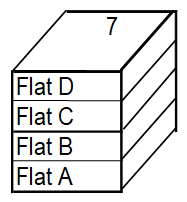
A house is divided into 4 flats which are addressed Flat A to Flat D.
All flats are accessed by a single door.
Create BLPUs for each of the flats, with SAOs as: “Flat A”, “Flat B”, 2Flat C”, “Flat D”, under a Parent of: 7.
7 “PP”
“Flat A” – “RD06”
“Flat B” – “RD06”
“Flat C” – “RD06”
“Flat D” – “RD06”
11.12.4 Suffixed PAOs (legacy data example 2)
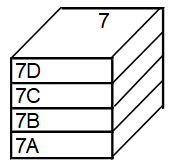
A house is divided into 4 flats which are addressed 7A to 7D.
All flats are accessed individually by a single door for each flat off the Street.
Create four BLPUs with PAOs as: 7”A”, 7”B”, 7”C” and 7”D” respectively, therefore all the BLPUs are numbered directly into the Street.
7”A” – “RD06”
7”B” – “RD06”
7”C” – “RD06”
7”D” – “RD06”
11.12.5 Descriptive flat (legacy data example 3)
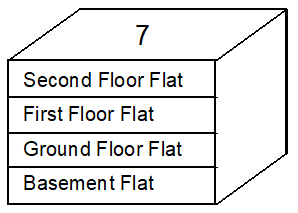
A house is divided into 4 flats which are addressed descriptively.
All flats are accessed by a single door.
This example is typical of data from many Council Tax systems, where descriptive flat locations are preferred instead of flat identifiers. In many cases these flats also have either alpha or numeric identifiers.
If alphabetical or numeric identifiers exist, use these instead of descriptions.
Only in exceptional circumstances should descriptive flat LPIs be added to the LLPG as approved Records. They may, however, be captured as Alternative LPIs or more appropriately in the LEVEL Record within the LPI Record.
Create BLPUs for each of the flats, with SAOs as “Basement Flat”, “Ground Floor Flat”, “First Floor Flat”, “Second Floor Flat”, under a Parent of: 7.
7 “PP”
“Basement Flat” – “RD06”
“Ground Floor Flat” – “RD06”
“First Floor Flat” – “RD06”
“Second Floor Flat” – “RD06”
11.12.6 Flats and suffixed building (legacy data example 4)
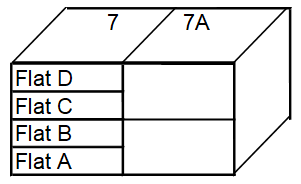
Two houses which are addressed 7 and 7A. 7 is divided into flats which are addressed Flat A to Flat D.
Create a Parent BLPU: 7 and a BLPU with a PAO of: 7”A”.
Create BLPUs for each of the flats, with SAOs as: “Flat A”, “Flat B”, “Flat C”, “Flat D”, under the Parent: 7.
7 “PP”
“Flat A” – “RD06”
“Flat B” – “RD06”
“Flat C” – “RD06”
“Flat D” – “RD06”
7”A” – “RD03”
11.12.7 Flats over shops (legacy data example 5)
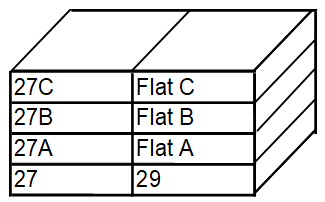
A building is divided with shops on the ground floor and flats on the upper floors.
Flats are accessed by one door.
Create BLPUs with PAOs of: 27, 27”A”, 27”B” and 27”C”.
Create BLPU with a PAO of: 29 for the shop which acts as a Parent.
Alternatively create Parent BLPU with a PAO of: 29 and a Child BLPU with a SAO of: “Shop”.
Create BLPUs with a SAO of: “Flat A”, “Flat B”, “Flat C”, under a Parent of: 29.
27 “CR08”
27”A” – “RD06”
27”B” – “RD06”
27”C” – “RD06”
29 – “CR08”
29 – “PP”
“Shop” – “CR08”
“Flat A” – “RD06”
“Flat B” – “RD06”
“Flat C” – “RD06”
11.12.8 Flats over common shop (legacy data example 6)
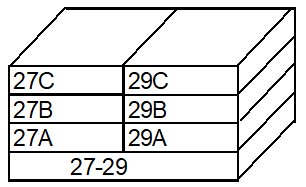
A building is divided with a shop on the ground floor and flats on the upper floors.
Flats are accessed by two doors.
Create BLPUs with PAOs of: 27-29, 27”A”, 27”B”, 27”C”, 29”A”, 29”B”, 29”C”.
27-29 - “CR08”
27”A” “RD06”
27”B” “RD06”
27”C” “RD06”
29”A” “RD06”
29”B” “RD06”
29”C” “RD06”
11.12.9 Complex block (legacy data example 7)
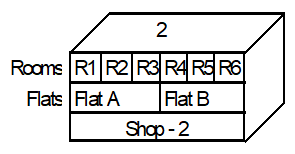
A building is divided with a shop on the ground floor, two flats on the first floor and rooms within a flat in multiple occupation on the second floor. (Flat C)
Create BLPU with a PAO of: 2 for the shop, which acts as a Parent.
UPRN: 1
PAO: 2
Alternatively create Parent BLPU with a PAO of: 2, and a Child BLPU with a SAO of: “Shop”.
UPRN: 2
PAO: 2
SAO: “Shop”
Create BLPUs with SAOs of: “Flat A” and “Flat B”, under the Parent: 2.
UPRN: 3
PAO: 2
SAO: “Flat A”
Create BLPU with a SAO of: “Flat C”, under the Parent: 2.
UPRN: 4
PAO: 2
SAO: “Flat C”
Create BLPUs with a SAO of: “Room 1 to Room 6”, “Flat C”, under the Parent: Flat and grandparent 2.
UPRN: 5
PAO: 2
SAO: “Room 1 Flat C”
2 “CR08”
or
“PP”
“Shop” – “CR08”
“Flat A” – “RD06”
“Flat B” – “RD06”
Second Floor “Flat” – “RH01”
“Room 1 to 6” – “RH02”
11.12.10
These examples show Authority Address Custodians how to deal with addresses which are either in the dataset as legacy addresses or which have been newly created as the formats described meet current conventions and best practice described at Section 4.
11.12.11 Current or new data examples
11.12.12 Numeric flat IDs (current or new data example 1)
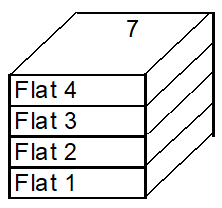
A house is divided into 4 flats which are addressed Flat 1 to Flat 4.
All flats are accessed by a single door.
Create BLPUs for each of the flats, with SAOs as: “Flat 1”, “Flat 2”, “Flat 3”, “Flat 4”, under a Parent of: 7.
7 “PP”
“Flat 1” – “RD06”
“Flat 2” – “RD06”
“Flat 3” – “RD06”
“Flat 4” – “RD06”
11.12.13 Basement flat (current or new data example 2)
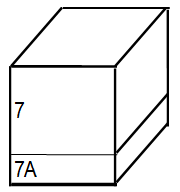
A house is divided into two flats which are addressed 7 and 7A. Both flats are accessed by separate doors.
Create two BLPUs with PAOs of: 7 and 7”A”.
Creating “Flat A” as a Child BLPU of: 7 can cause confusion (mail being delivered to 7 by mistake).
7 - “RD06
7”A” – “RD06”
11.12.14 Suffixed building (current or new data example 3)
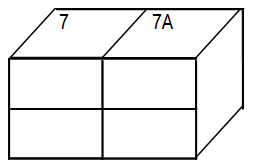
Two separate houses which are addressed 7 and 7A.
Create two BLPUs with PAOs of 7 and 7”A”.
7 - “RD03”
7”A” – “RD03”
11.12.15 Suffixed building (current or new data example 4)
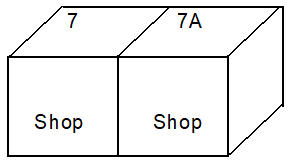
Two separate shops which are addressed 7 and 7A.
Create two BLPUs with PAOs of: 7 and 7A.
7 “CR08”
7A – “CR08”
11.12.16 House in multiple occupation (current or new data example 5)
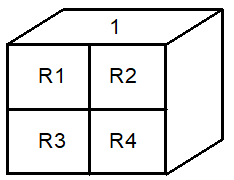
A building is divided into rooms occupied by separate households.
This example is typical of data from many Electoral Registration systems, where properties are canvassed according to occupation as opposed to physical features.
Create a Parent BLPU with a PAO of: 1.
Create BLPUs with SAOs of: Room 1 to Room 4, under the Parent: 1.
1 “RH01”
Room 1 – “RH02”
Room 2 – “RH02”
Room 3 – “RH02”
Room 4 – “RH02”
11.12.17 Complex block (current or new data example 6)
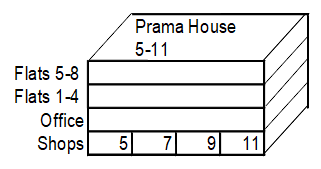
A building is divided into a mix of commercial and residential units. The upper floors are accessed by a separate door.
Create BLPUs with PAOs of: 5, 7, 9, 11.
Create a Parent BLPU: “Prama House 5-11”.
Create BLPUs for each of the flats with SAOs: Flat 1 to Flat 8, under the Parent: Prama House 5-11.
Create a BLPU for the office with a SAO of Office, under the Parent: 5-11.
5 “CR08”
7 “CR08”
9 “CR08”
11 “CR08”
“Prama House”
5-11 “PP”
Flats 5-8 “RD06”
Flats 1-4 “RD06”
Office “CO01”
11.12.18 Complex block (current or new data example 7)
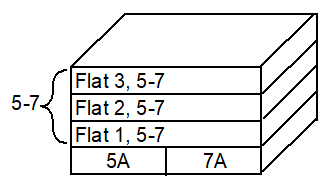
A building is divided into residential units. The ground floor flats which are addressed as flats 5A and 7A are accessed by separate doors.
Create BLPUs with PAOs of: 5A and 7A.
Create a Parent BLPU: 5-7.
Create BLPUs for each of the flats with SAOs of: Flat 1 to Flat 3, under the Parent 5-7.
5-7 “PP”
Flat 1 “RD06”
Flat 2 “RD06”
Flat 3 “RD06”
5A “RD06”
7A “RD06”
11.12.19 Individually numbered maisonettes (current or new data example 8)
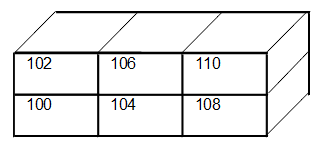
A single building can have two addresses and two access doors, typically giving individual access to an upper and lower flat or maisonette.
Create BLPUs with PAOs of: 100, 102, 104, 106, 108, 110.
100 to 110 “RD06”
11.12.20 Block on two streets (current or new data example 9)
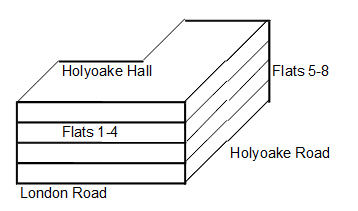
A complex property with a single block which is accessed from different Streets.
Create a Parent BLPU for Holyoake Hall 21 London Road, with an Alternative LPI of Holyoake Hall 45 Holyoake Road.
Create BLPUs with SAOs of: Flat 1 to Flat 4 on London Road, under the Parent Holyoake Hall, 21 London Road.
Create BLPUs with SAOs of: Flat 5 to Flat 8 on Holyoake Road, under the Parent Holyoake Hall, 45 Holyoake Road.
“Holyoake Hall”,
“21 London Road”
(Alternative LPI: “Holyoake Hall”, “45 Holyoake Road”) “PP”
Flat 1 to Flat 8 “RD06”
11.12.21 Two blocks, two streets (current or new data example 10)
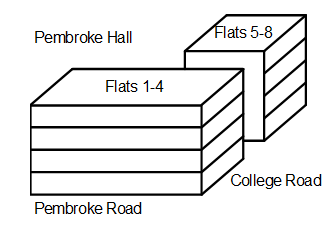
A complex property with more than one block which are accessed from different Streets but share a building name.
Addresses should be created for Block 1 and Block 2 under the shared building name.
Create a Parent BLPU for Pembroke Hall with two LPIs, the Approved Preferred LPI associated with Pembroke Road, Alternative LPI associated with College Road.
UPRN: 1
PAO: Pembroke Hall 21
Street: Pembroke Road
Create 2 Child BLPUs with SAOs of: Block 1 and Block 2 to identify each building but indicate they have a relationship
UPRN: 2
PAO: Pembroke Hall 21
SAO: Block 1
Street: Pembroke Road
Parent UPRN: 1
UPRN: 3
PAO: Pembroke Hall 21
SAO: Block 2
Street: College Road
Parent UPRN: 1
Create 4 Child BLPUs with SAOs of: Flat 1 to Flat 4 Block 1 on Pembroke Road.
UPRN: 4
PAO: Pembroke Hall 21
SAO: Flat A Block 1
Street: Pembroke Road
Parent UPRN: 2
Create 4 Child BLPUs with SAOs of: Flat 5 to Flat 8 Block 2 on College Road.
UPRN: 8
PAO: Pembroke Hall 45
SAO: Flat 5
Street: College Road
Parent UPRN: 3
“Pembroke
Hall” “PP”
Block 1 “PP”
“Flat 1 to Flat 4” “RD06”
“Flat 5 to Flat 8”
11.12.22 Rear workshops / block (current or new data example 11)
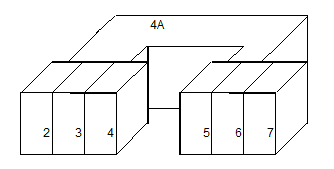
A workshop to the rear of a group of houses is addressed with a number and suffix.
Create BLPUs with PAOs of: 2, 3, 4, 4A, 5, 6, 7.
2 “RD04”
3 “RD04”
4 “RD04”
4A “CI03”
5 “RD04”
6 “RD04”
7 “RD04”
11.12.23 Complex block (current or new data example 12)
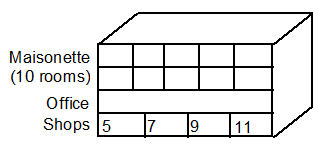
A building is divided with shops on the ground floor, a single office on the first floor and rooms within a maisonette in multiple occupation on the second and third floor.
Create BLPUs with PAOs of: 5, 7, 9, 11.
Create a Parent BLPU: 5-11.
UPRN: 1
PAO: 5-11
Create a BLPU with a SAO of: Office, under the Parent 5-11.
UPRN: 2
PAO: 5-11
SAO: Office
Parent UPRN: 1
Create a BLPU with a SAO of Second and Third Floor Maisonette, under the Parent 5-11.
UPRN: 3
PAO: 5-11
SAO: Second and Third Floor Maisonette
Parent UPRN 1
Create BLPUs with a SAO: of Rooms 1-10, Second and Third Floor Maisonette, under the Parent Second and Third Floor Maisonette and grandparent 5-11.
UPRN: 4
PAO: 5-11
SAO: Room 1 Second and Third Floor Maisonette
Parent UPRN 3
5 “CR08”
7 “CR08”
9 “CR08”
11 “CR08”
5-11 “PP”
Office “CO01”
Second and Third Floor Maisonettes “RH01”
Rooms 1 to 10 “RH02”