11.8.3.1
In Figure 14, “Unit 1” is made historical and the LPI is changed to “Former Unit 1”. Two new BLPUs are created for “Unit 1” and “Unit 1A”.
Example 1: Unit 1 is split into two units:
UPRN
123400000020
PAO_PAO_TEXT
“Unit 1”
UPRN
123400000020
BLPU LOGICAL_STATUS
8
PAO_TEXT
“Former Unit 1”
UPRN
123400008001
BLPU LOGICAL_STATUS
1
PAO_TEXT
“Unit 1”
UPRN
123400008002
BLPU LOGICAL_STATUS
1
PAO_TEXT
“Unit 1A”
11.8.3.2
If “Unit 1” and “Unit 1A” are then merged back together, the historical BLPU must then be restored to a LOGICAL_STATUS = 1 - Approved BLPU and the two ‘new’ BLPUs set as historical Records. A new Approved Preferred LPI must be added describing the property as it is currently known.
11.8.3.3
Example 2: Units 1 and 1A are merged:
UPRN
123400000020
BLPU LOGICAL_STATUS
1
PAO_TEXT
“Former Unit 1”
LPI LOGICAL_STATUS
8
PAO_TEXT
“Unit 1”
LPI LOGICAL_STATUS
1
UPRN
123400008001
PAO_TEXT
“Former Unit 1”
BLPU LOGICAL_STATUS
8
UPRN
123400008002
PAO_TEXT
“Former Unit 1A”
BLPU LOGICAL_STATUS
8
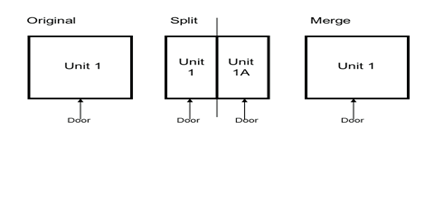
Figure 14 - Splits and mergers
Note: In Figure 14, it is assumed that “Unit 1” and “Unit 1A” revert to the original state after the merge which follows the split.
11.8.3.4
Authority Address Custodians do not have to capture land relating to historical planning documents. The inclusion of land which relates to historical planning application data within LLPGs is optional and depends on the corporate use of the data for Local Land Charge searches and other planning related uses. The dissemination of this information to GeoPlace does not cause any problems, subject to the Records being correctly formatted, set as historical and not duplicating any current data.